
Template toolkit
The template toolkit lets you write a template in your own editor with a live preview: change template.liquid, save, and a moment later the preview in your browser shows the result – rendered by your openbill instance, with real documents or sample data, laid out in pages like the PDF. When you are done, pnpm push writes the files back to openbill.
Requirements
- Node.js 24 or newer and pnpm (
corepack enablesets pnpm up). - An openbill instance your computer can reach. The toolkit renders on the instance; without it there is no preview.
APP_URLof the instance must be the https address you reach openbill under: the download writes it into.env.local, never the address of the request. The toolkit refuses plainhttp://except forlocalhost,127.0.0.1and::1, so the token never travels unencrypted.- An imported or duplicated template. The built-in templates (Klar, Kante, Leise) are read-only: open one and choose Duplicate to customize first.
Download
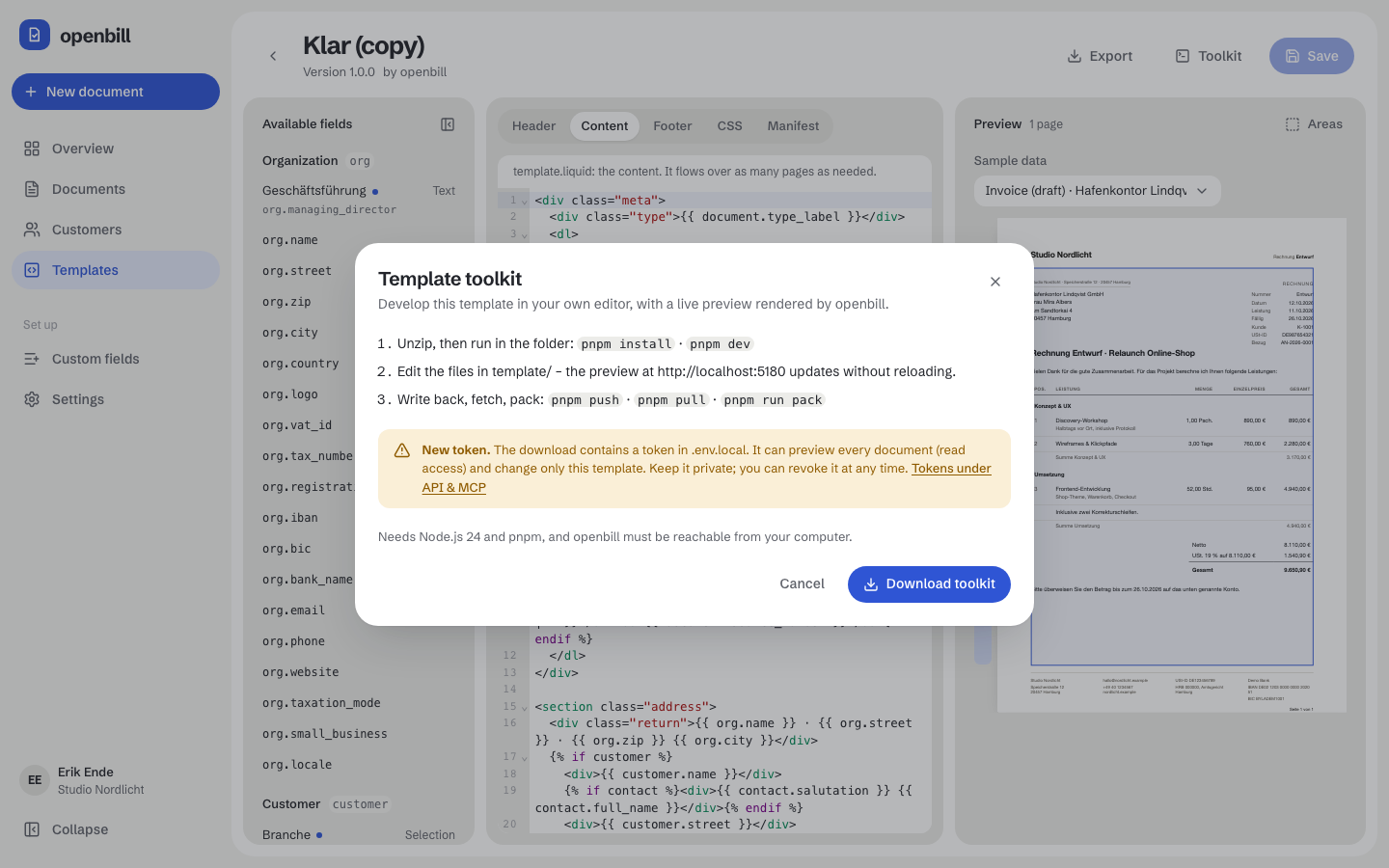
Open the template in the editor and choose Toolkit → Download toolkit. Unsaved changes are saved first (Save and download). The ZIP contains one folder openbill-<template>:
| Path | Content |
|---|---|
template/ | the template as package files: manifest.json, template.liquid, header.liquid, footer.liquid, styles.css, assets/… |
.env.local | OPENBILL_URL (the APP_URL of the instance), OPENBILL_TOKEN, OPENBILL_TEMPLATE_ID |
.gitignore | keeps .env.local, node_modules/ and packed ZIPs out of git |
package.json, pnpm-workspace.yaml, vite.config.js, index.html, assets/, tooling/ | the toolkit itself, prebuilt; it only installs Vite |
README.md | the short version of this page |
AGENTS.md | instructions for coding agents: which files to edit, how to read render errors, the Liquid rules that matter |
The token
Every download creates a new token for you, named Toolkit: <template> (<date>), with the abilities templates:render and templates:write, bound to this template. It can
- render every document of the instance in the preview – this is read access to all documents (customers, addresses, positions, amounts), the same as
templates:renderin the REST API; - read and write this one template (
GET /api/templates/{id},GET /api/templates/{id}/package,PUT /api/templates/{id}/files).POST /api/renderrenders only with this template: the request must name it astemplate_id(another one or none → 403), so the token never sees the output of other templates.
It cannot change documents, customers or settings, cannot read, render with or change other templates, cannot delete or duplicate this template, cannot create tokens and cannot use MCP. Keep .env.local private. The token appears under Settings → API & MCP as Toolkit · <template>; Revoke ends it at once. Deleting the template deletes its toolkit tokens. Older downloads keep working until you revoke their tokens.
Start
unzip openbill-toolkit-<template>.zip
cd openbill-<template>
pnpm install
pnpm dev
Open http://localhost:5180 (another port: pnpm dev --port 5181).
The preview page
- Data switches between the sample scenarios (short and long invoice, small business, reverse charge, quote with optional items; Language English or German) and your recent documents, drafts included. It starts with the newest document, like the template editor.
- Areas shows the header, content and footer areas; on the right you see the page count.
- Fields lists the core and custom fields of every level; a click copies the Liquid expression with the fitting filter. Fields that
manifest.jsonlists inexpectedFieldsbut openbill does not know are marked missing: they stay empty until you create them under Custom fields. - Errors appear in a box at the bottom right: Liquid errors with file, line and the lines around it (
template.liquid:12), a brokenmanifest.jsonwith its line, and connection problems. The preview below keeps the last working state.
Every save in template/ renders again after a short pause. The page does not reload and keeps its scroll position. Several saves in a row cause one render; an older answer never replaces a newer one.
Assets: The preview uses the assets saved in openbill (POST /api/render takes no files). New or changed files in template/assets/ appear after pnpm push; the page says so when you change them.
Example: a click on document → number copies {{ document.number }}, on position → unit_price {{ p.unit_price | money }} (positions are read inside {% for p in … %}). The Liquid reference explains the context and the filters.
Commands
| Command | What it does |
|---|---|
pnpm dev | preview at http://localhost:5180 |
pnpm push | writes all files of template/ to openbill (PUT /api/templates/{id}/files): the four parts, manifest.json and the complete assets list (files missing locally are removed in openbill). Checked first, before anything is sent: only package files, parts up to 200 KB each, assets png, jpg, jpeg, gif, webp, svg, woff, woff2, ttf, otf up to 2 MB each, 20 MB in total, at most 100 files, no symbolic links, valid manifest.json. |
pnpm pull | fetches the saved template into template/ and the field schema into schema.json. When local files differ, it stops and lists them; pnpm pull --force overwrites them and removes local package files openbill does not have. |
pnpm run pack | packs template/ as template package (<name>-<version>.zip, or --out file.zip) for Templates → Import ZIP, e.g. on another instance. Same checks as push, and the ZIP may be at most 10 MB like the import. |
Use pnpm run pack: pnpm pack without run is pnpm's own command (it builds npm tarballs) and fails in the toolkit folder.
Working with an AI agent
An AI agent can design the template for you. There are two ways, and both end in the same template in openbill.
A coding agent in the toolkit folder (Claude Code, Codex, …): start pnpm dev, open the agent in the openbill-<template> folder and describe the look you want. The agent edits template/template.liquid, styles.css, header.liquid and footer.liquid; every save renders again, and you watch the result in the preview. AGENTS.md in the folder tells the agent what to edit, the Liquid rules that bite (amounts are strings, empty texts are true, no scripts or external URLs) and how to read the newest render with its errors as JSON (http://localhost:5180/__openbill/state) while pnpm dev runs. When you like it, pnpm push saves it in openbill.
The agent can read every file in the folder, .env.local with the toolkit token included: that token can render every document of the instance. Only use agents you would also show your documents.
An agent over MCP, without a download: connect it as described in MCP. It reads the template with get-template, tries changes with render-template-preview (Liquid errors with line, page count, missing fields and a text excerpt, rendered with sample data or a real document, without saving) and saves them with update-template. The resource openbill://docs/liquid-reference gives it the Liquid reference. It works only on your own templates; duplicate a built-in one first. It cannot see the PDF itself, so check the result in the template editor.
Local instance with its own certificate
Node does not trust the certificates of a local development CA (DDEV, mkcert) by default; the toolkit then reports Node does not trust the certificate. Start it with the system certificate store:
NODE_OPTIONS=--use-system-ca pnpm dev
NODE_OPTIONS=--use-system-ca pnpm push
Troubleshooting
| Message | What to do |
|---|---|
| Cannot reach … | Start openbill, or correct OPENBILL_URL in .env.local. |
| openbill refused the token (401) | The token was revoked. Download the toolkit again, or put a new token into .env.local. |
| The token may not do this (403) | OPENBILL_TEMPLATE_ID points to another template than the token. |
| Built-in templates are read-only | Duplicate the template and download the toolkit of the copy. |
| Missing OPENBILL_URL … | .env.local is missing or incomplete. |
| OPENBILL_URL must use https:// | APP_URL of the instance is a plain http:// address. The operator sets APP_URL to the https address, then download the toolkit again. |
| Nothing was pushed: fix template/ first | The list below names every file that the import would refuse. |
| The template toolkit is missing in this installation (download) | The operator did not build the kit (pnpm build); the Docker image contains it. |
Security
- The token stays in the dev server (Node). The preview page never receives it, and Vite never serves
.env.local. - The dev server answers its preview endpoints only for
localhost(also against DNS rebinding from a web page) and accepts changes only as JSON. - Rendering stays on the server, with the same sandbox as everywhere in openbill: no scripts, no external resources.