
E-invoices
openbill creates e-invoices according to EN 16931 in the UN/CEFACT CII syntax (Factur-X / ZUGFeRD profile EN 16931). The XML is embedded in a PDF/A-3b, so one file serves people and accounting software.
No tax or legal advice
openbill helps you write invoices that meet EN 16931 and checks what it can, but it is no tax or legal advice and does not guarantee that your documents, your archive or your processes meet the rules that apply to you (e.g. GoBD, VAT law). Check your setup with your tax advisor. openbill comes without warranty (MIT License).
Turning it on
The compliance profile is set per document type: basic or en16931. The e-invoice profile can only be chosen for invoices and cancellations. With en16931, finalizing checks everything an e-invoice needs (see compliance profiles) and stops with a list of what is missing.
What finalizing does
For an invoice or cancellation with the profile en16931 openbill, in the same step that assigns the number,
- builds the CII XML from the frozen master data and the totals,
- checks it against the EN 16931 XML schema (an invalid XML stops finalizing),
- renders the PDF with the document's template and has Gotenberg convert it to PDF/A-3b with the XML embedded as
factur-x.xml, - archives the PDF and the XML.
If any step fails – a template error, an invalid XML, Gotenberg not reachable – nothing is saved: the document stays a draft and the number stays free.
Documents with the profile basic (and offers and order confirmations) get a regular PDF without XML.
Cancellations are credit notes
A finalized cancellation becomes a credit note (type code 381) with positive amounts that refers to the cancelled invoice (number and date). It carries the payment terms "The amount will be refunded." in the document language. Its tax categories and rates are those of the invoice (see taxes and totals), even if the organization, the customer or the rate changed since.
Discounts
A discount is an item with a negative price. In the XML the price stays positive and the quantity carries the sign (EN 16931 forbids negative net prices); the line amount is the same.
Taxes
| Situation | Tax category | Exemption reason |
|---|---|---|
| regular rate | S | – |
| zero rate | Z | – |
| small business (§ 19 UStG) | E | the small business note |
| EU reverse charge | AE (buyer VAT ID required) | the reverse charge note |
| goods to customers outside the EU | G | the third country note |
| services to businesses outside the EU | O (no rate) | the note on services not taxable in Germany |
| services to private persons outside the EU | the position's rate (usually S) | – |
Without a tax note or legal note an exempt category gets a standard reason (for example "Exempt from VAT").
O – not subject to VAT: services to businesses outside the EU (customer options “What you supply” = services and “Customer” = business, § 3a (2) UStG). Services to private persons outside the EU are taxed in Germany (§ 3a (1) UStG): they keep the regular rate of the position and get no exemption note. The XML then contains neither your VAT ID nor the customer's (BR-O-02) and no VAT rate; your register number identifies you (BR-CO-26), so the e-invoice profile requires it. Goods to customers outside the EU stay exports (G) and need your VAT ID. Documents finalized before this option existed keep their category through their snapshot.
The legal notes are also part of the XML as document notes.
What goes into the XML
| openbill | EN 16931 |
|---|---|
| number, date | invoice number (BT-1), issue date (BT-2) |
| organization | seller name, address, VAT ID (VA) and/or tax number (FC), register number (BT-30), e-mail |
| customer | buyer name, customer number, address, VAT ID |
| service date (period) | delivery date (BT-72), invoicing period (BT-73/74) |
| IBAN, BIC | SEPA credit transfer (payment means 58) |
| due date | payment due date (BT-9) |
| items | name, description, net price (4 decimals), quantity with UN/ECE unit code, tax category and rate, line amount |
| totals | sum of lines, tax basis, tax total, grand total, amount due |
Text lines are not part of the XML; optional items only exist in offers.
Downloads
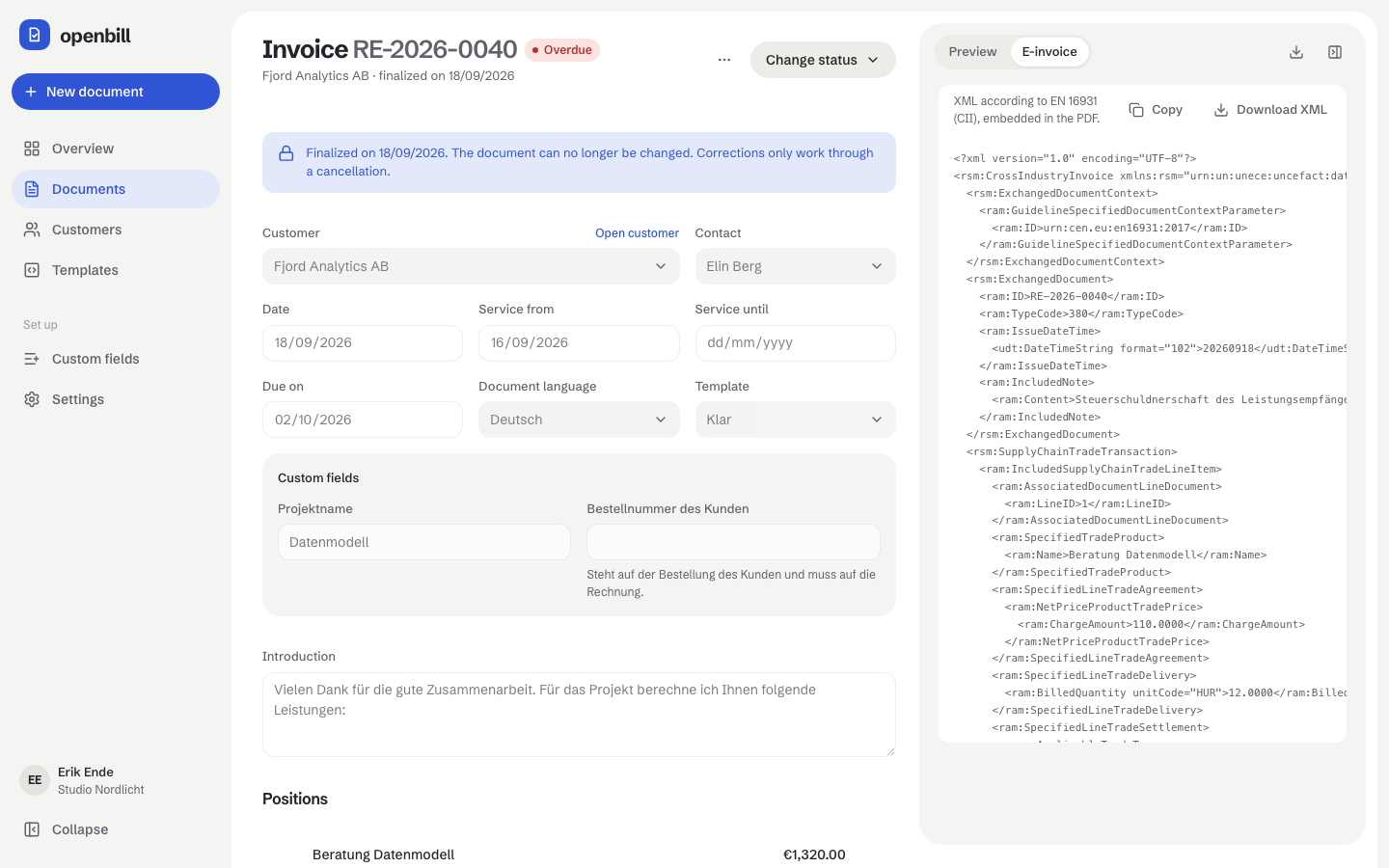
The archived PDF and the archived XML can be downloaded separately; both are always the files from the archive, never rendered again. Only finalized invoices and cancellations with the e-invoice profile have an XML.
Archive
Archived files live in storage/app/archive/<year>/<document id>.pdf and .xml. openbill stores the SHA-256 checksum of every file and checks it on every download: a changed or missing file is reported as an error instead of being replaced. Back up this folder together with the database.
Requirements and limits
- Gotenberg 8.34 or newer (the Docker image
gotenberg/gotenberg:8is).GOTENBERG_TIMEOUT(seconds, default 20) limits each PDF request; keep it well below the database lock wait timeout (50 s). - openbill checks every XML against the schema before archiving it. The business rules of EN 16931 (Schematron) are covered by the compliance profile. In development and CI, the e-invoice cases of the test suite are checked twice (
scripts/validate-einvoice.sh): with the official CEN Schematron and with the KoSIT validator in its scenario “EN16931 (CII)” (schema and EN 16931 rules; the German XRechnung rules BR-DE, for example the Leitweg-ID, are not part of it, because openbill does not produce XRechnung). - The seller needs a VAT ID or a register number; with regular taxation, reverse charge and customers outside the EU need the VAT ID (small businesses invoice with category
E, where the tax number is enough). - Customers outside the EU: goods are taxed with category
G(export), services to businesses with categoryO(not subject to VAT, without VAT IDs in the XML), services to private persons with the regular rate of the position. - Not supported yet: XRechnung with Leitweg-ID, currencies other than EUR, document-level allowances and charges.